Shared Team Inbox vs Personal WhatsApp Phones: What Changes When a Sales Team Goes Official
NXTAA Team
Sales Operations Specialist
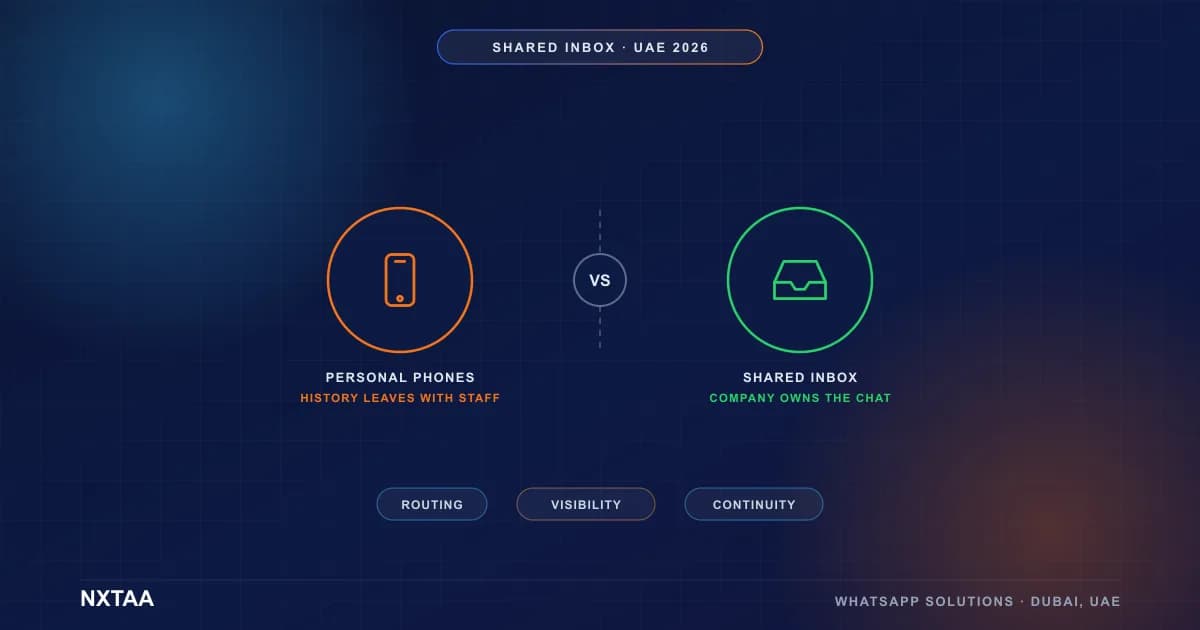
Moving a sales team from personal WhatsApp phones to a shared inbox on an official business number changes who owns conversations. The company, not the individual, holds the history, the routing and the numbers. You gain continuity, accountability and reporting. You lose the "my clients, my phone" habit, which is the part that needs managing.
Key Takeaways
- Personal phones make conversations, contacts and customer history the property of whoever holds the device
- A shared inbox on an official number adds routing, ownership, reporting and continuity
- The hardest part of the change is cultural: reps lose private control of their client conversations
- Compare options on risk, visibility and handover, not only on features
- Roll out in phases, starting with new leads, and keep rep workload visible
- Decide in advance how existing contacts and chat history will be handled
The Phone That Walked Out the Door
Two UAE teams, in different industries, ran into the same problem within the same year. One was a business-setup consultancy with a call-centre front line. The other was a car rental company with sales agents handling corporate and long-term accounts.
Both ran on personal WhatsApp. Agents used their own phones, or company-issued handsets treated as personal. Customers saved the agent's number. Deals lived in chat threads.
Then a senior agent left one team. Her phone went with her. So did the history with a dozen active corporate accounts, the negotiated terms in chat, and the customers' habit of messaging her. For weeks, clients wrote to a number that no longer answered. Two accounts drifted to a competitor.
The other team had a different scare. An agent forwarded a customer's rental documents from his personal phone to a colleague, and the screenshots ended up in a group chat that included people outside the company. Nobody was malicious. The setup simply made it easy for sensitive information to leave.
Looking back, the technology was never the weak point. WhatsApp worked fine. The weak point was that the business did not control the channel it ran sales on.
Side by Side: Personal Phones vs Shared Inbox
| Area | Personal phones | Shared inbox on an official number |
|---|---|---|
| Who owns the number | The individual | The company |
| Conversation history | On one device | Central, searchable, retained |
| When someone leaves | Contacts and history leave too | Conversations stay and are reassigned |
| Routing | Whoever the customer messaged | Rules by topic, language, owner |
| Visibility for managers | None without asking | Full: open chats, ages, response times |
| Collaboration | Screenshots and forwards | Internal notes, assignment, transfer |
| Bulk and templated sends | Risky on a personal number | Approved templates on the business API |
| Reporting | Guesswork | Response times, volumes, outcomes |
| Compliance and audit | Hard to show | Logged and controllable |
| Customer experience | Depends on the agent's availability | Consistent, with coverage rules |
The pattern is consistent. Every row where the shared inbox wins is a row where the company, rather than a person, holds the control.
What Actually Changes
Ownership of the relationship moves to the company
This is the big one. On a personal phone, the relationship feels like the rep's. In a shared inbox, the customer's relationship is with the business, and reps work it on the business's behalf. Done well, that is good for reps too, because leads are routed to them and their performance is visible.
Routing replaces luck
With personal phones, a customer's message lands on whoever they happened to message. With a shared inbox, rules decide: by language, by service, by account owner, by availability. Our guide on building an accountable WhatsApp enquiry workflow shows how to set those rules.
Visibility replaces trust-me reporting
Managers can see how many conversations are open, how long customers waited and who is overloaded. It makes coaching specific, and it protects strong agents whose work was invisible.
Continuity replaces heroics
If an agent is sick or on leave, a colleague opens the conversation, reads the history and carries on. Customers do not wait for one person to return.
Messaging gets safer
An official number on the WhatsApp Business API uses approved templates, opt-in tracking and quality monitoring. Personal-number bulk sending is the quickest route to a ban. See our guide to recovering a banned WhatsApp account for what that looks like.
The Cultural Change Is the Hard Part
Technology rollouts fail when people feel something is being taken from them. Here, something is. Reps lose private control of "their" conversations, and some will resist.
Common reactions and honest answers:
- "My clients trust me, not the company." Fair. Keep the rep as the named owner, with their name and photo in the conversation where the system allows
- "Managers will watch everything." Yes, work conversations are visible. Explain the purpose: coverage, coaching and protecting the business, not surveillance of personal chats
- "I will lose my contacts." They stay with the business. If a rep leaves, the clients stay too, and that is the point
- "It is slower." Setup is a one-off. Daily use is usually faster, because history, templates and notes sit in one place
Planning to move your sales team to an official WhatsApp setup? Talk to NXTAA and we will help you plan the rollout, the rules and the conversation with your team.
A Phased Move That Works
Do not flip everyone overnight. Here is the rollout both teams used, over about six weeks.
| Phase | Weeks | Work | Result |
|---|---|---|---|
| 1. Prepare | 1 | Define roles, routing rules, templates; set up the official number and inbox | Ready to pilot |
| 2. Pilot | 2 to 3 | New leads only, one small team | Fix routing and templates early |
| 3. Expand | 4 | All new leads to the shared inbox | Most volume moves naturally |
| 4. Migrate accounts | 5 to 6 | Move existing key accounts with a personal introduction | Relationships carry over |
| 5. Retire | 6 onward | Stop using personal numbers for business | Single channel |
Starting with new leads is the safest move. Nobody's existing relationships are disturbed, and the team learns the tool on low-risk conversations.
Moving Existing Contacts
This is where most plans wobble. Three practical points:
- Customers will not switch numbers because you ask once. Introduce the change personally: "From next week, message our official number and I will still look after you"
- Plan for the old thread. Agree whether personal numbers stay on for a defined transition period, with a polite redirect message
- Ask your provider about number migration options. Traditionally a number has to leave the regular app to join the API, which affects chat history, and newer options may exist for some setups. Get the current answer from your provider before you promise anything to your team
What Managers Can Finally See
Visibility is the benefit managers value first, because it answers questions that used to take a meeting:
| Question | Where the answer comes from |
|---|---|
| How many conversations are open right now? | Inbox status counts |
| Who is overloaded? | Open chats per agent |
| How fast do we reply? | First-response and resolution times |
| Which enquiries are going cold? | Aging reports by owner |
| Which topics create the most chats? | Tags and categories |
| What happens outside office hours? | Volumes and response by time of day |
These numbers also protect good agents. A rep who handles a heavy, complex book of clients stops being judged on gut feeling and starts being judged on evidence.
Governance: Tone, Templates and Data
An official number is a company voice, so a few rules help it stay consistent:
- Tone guide. Short, clear guidance on greetings, language and what never to say
- Approved templates and quick replies. A shared library so agents do not reinvent answers or promise the wrong thing
- Data handling. Who may see customer documents and personal details, and how long they are kept
- Escalation paths. Complaints, refunds and legal threats go to named people
- Offboarding. When someone leaves, their open conversations are reassigned the same day
Written down once, these rules turn an inbox into a controlled channel instead of a free-for-all.
Two Scenarios, Compared
Take a senior agent leaving on a Thursday. On personal phones, she takes the numbers and chat history with her, her clients wonder who to contact, and a manager spends a week piecing together who was promised what. In a shared inbox, her open conversations are reassigned on Thursday afternoon, with her notes attached, and her clients get a message introducing the colleague who has taken over. The business loses an employee, not a book of customers.
Objections From Leadership
Reps are not the only ones who push back. Owners and directors raise questions too, and they deserve straight answers:
- "Is it worth the cost?" Compare the subscription and setup with the value of one lost corporate account. Most teams find a single recovered relationship covers a year
- "Will customers mind a different number?" Few do, once the change is introduced personally and the old number redirects politely
- "Can we trust staff with customer chats anyway?" The point is not distrust. It is that no single person should be a single point of failure
- "Do we need this now?" If turnover, growth or a compliance review is on the horizon, yes. Moving later costs more because there is more history to move
Mistakes We Made
- We announced the change by email. Reps felt it was imposed. A short team session with the reasons worked far better
- We ignored incentives. If commission depends on "my" accounts, name owners in the system and credit them properly
- We did not cover leave. Cover rules for holidays and sick days were an afterthought. They should be in the routing rules from day one
- We forgot the data rules. Customer documents and personal details need handling rules. Decide who may see what and how long you keep it
- We kept both channels open too long. Parallel running with no end date meant the old habits survived
Can't We Just Use Linked Devices?
Sometimes, yes. Vendors selling inboxes tend to skip this part.
Most published guides put the WhatsApp Business app at one primary phone plus four linked devices, with up to ten through the paid Meta Verified subscription where it is offered. Check the current limit in the app, because the figures do shift.
Picture a small clinic in Jumeirah with one receptionist, a practice manager and a nurse who covers lunch. They answer perhaps 30 messages a day, all three sit in the same room, and when someone is unsure they just ask. Linked devices do that job well. An API project would be overkill.
Now picture the car rental team from the story above, with agents on different shifts and corporate accounts to protect. Linked devices give everyone the same screen, and that is the limit of it:
| Need | Linked devices | Shared inbox on the API |
|---|---|---|
| Several people answer one number | Yes, up to the device cap | Yes |
| One named owner per conversation | No | Yes |
| Rules that route by language or service | No | Yes |
| Response times by agent | No | Yes |
| Approved templates sent at volume | No | Yes |
| Two agents kept from answering the same customer | Only by asking each other | Yes |
Linked devices also depend on the primary phone, which has to stay active or the others eventually log out. If that handset belongs to the person who left, you are back in the opening story.
The honest test is simple. If your team can sort out who replies by talking across the room, start with linked devices. Once anyone asks "did someone answer this customer?", you have outgrown them.
Is a Shared Inbox Always the Answer?
For a very small team, a shared inbox can be more than needed. A solo consultant does not need routing rules. But if two or more people answer customers on WhatsApp, or if any staff turnover would hurt, the case for an official number is strong.
It also fits into a larger picture. A shared inbox is one channel of an omnichannel setup, and the way you organise numbers matters, as we explain in one WhatsApp number or two.
Rollout Checklist
- Choose the official number and register it on the WhatsApp Business API
- Define roles, owners, routing and cover rules
- Prepare templates and bilingual quick replies
- Agree data handling rules for documents and personal details
- Brief the team in person on the reasons and the rules
- Pilot with new leads and one small team
- Introduce existing accounts personally before moving them
- Set an end date for personal-number use
How NXTAA Can Help
We move UAE sales and support teams to official WhatsApp setups without losing momentum:
- Number registration, API setup and shared inbox through our WhatsApp Business API service
- Team workflows, routing and reporting in our contact center solutions
- CRM connection and automation with marketing automation
Ready to take control of your WhatsApp conversations? Contact NXTAA and we will plan the move with you.
You Might Also Like
- Who Owns This Lead? Building an Accountable WhatsApp Enquiry Workflow
- One WhatsApp Number or Two?
- Omnichannel CRM for UAE Businesses
- How to Register for WhatsApp Business API in the UAE
FAQ
What is a shared team inbox for WhatsApp? It is one inbox on an official business number where several agents see, assign and answer conversations, with history kept centrally instead of on personal phones.
Why not let sales reps use their own WhatsApp? Personal phones keep history and contacts with individuals, give managers no visibility and make it easy to lose customers when someone leaves.
Will reps lose their client relationships? No. Reps can stay the named owner of their accounts. What changes is that the company holds the history and the number.
Can I move existing customers to the new number? Yes, but introduce the change personally and run a short transition period. Customers rarely switch on one announcement.
Does an official number reduce ban risk? Largely yes. The business API uses approved templates, opt-in tracking and quality monitoring, which beats bulk sending from a personal number.
Is a shared inbox worth it for a small team? If two or more people answer customers, or turnover would hurt, yes. A single person with a handful of clients may not need one yet.
How long does the move take? About six weeks for a phased rollout: prepare, pilot with new leads, expand, migrate key accounts and retire personal numbers.
How many people can use one WhatsApp Business number? On the Business app, most guides put it at the primary phone plus four linked devices, with up to ten through the paid Meta Verified subscription where offered. For more people, or for assignment and reporting, you need a shared inbox on the WhatsApp Business API.